UDISE+ is the Ministry of Education’s unified data system for schools in India. Schools, blocks, districts and states use it to update profiles, teachers, facilities and student records. Public users can also look up school info via Know Your School (KYS) without logging in.
UDISE Plus Logins
School Directory & User Management (UD module)
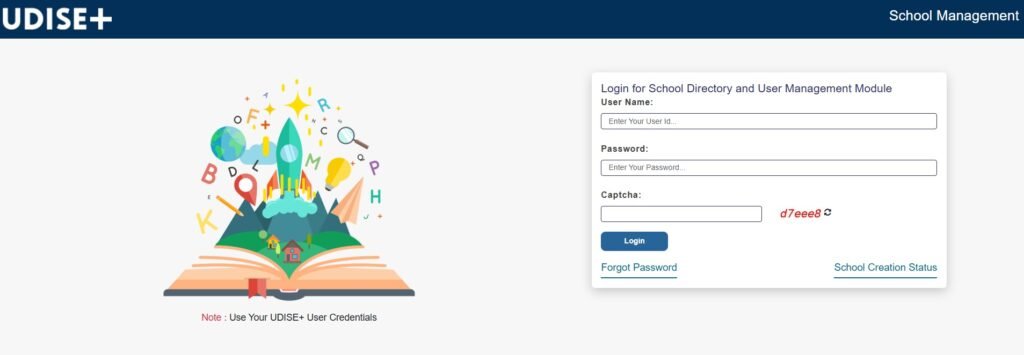
Manage school login, creation status and related directory tasks. You Can log in here
SDMS / UDISE+ Student Module Log In
➤ Update student data (enrolment, transfers, progression). You select your state, then sign in. Click here to log in

Profile & Facility / Teacher modules Udise+ Log In
➤ Maintain school profile, infrastructure and teacher data from the main UDISE+ portal. (Username is your 11-digit UDISE code; password is provided by your Block MIS Coordinator.) Click here to log in .

KYS (Know Your School) Log In
Public search—no login. Web and Android app available. Click here to find udise codes
Prerequisites
➤ Your 11-digit UDISE code (this is your username on many school-side modules).
➤ Password (generally issued by the Block MIS team for the school’s first access).
➤➤ A stable network and the latest version of your browser.
Tip: Some schools still have 10-digit codes in older lists—prefix a 0 to make them 11 digits when logging in (common practice reflected in portal guidance).
Login to UDISE+ School Directory & User Management (UD)
This is the “UD” module for directory/user tasks.
➤ Open: udiseplus.gov.in/ud/mainhome.
➤ Enter Username (usually the school’s UDISE code) and Password, solve Captcha, then Login.
➤➤ If you see “School Creation Status”, you’re in the right place for directory-level actions.
Forgot Password here?
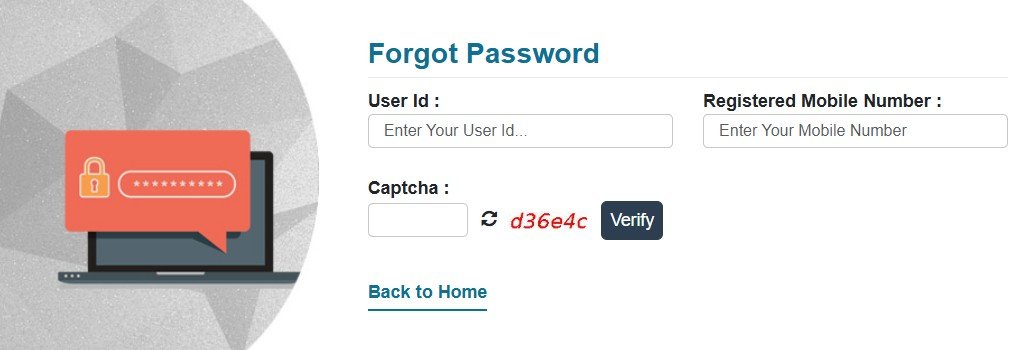
➤ Click Forgot Password on the UD login page. You’ll be asked for User ID, registered mobile, and Captcha, then you can set a new password.
Login to UDISE+ SDMS / Student Module
Use SDMS for enrolment, dropouts, transfers, progression, etc.
➤ Go to sdms.udiseplus.gov.in and select your State (you may also see a direct login page on some routes).
➤ Click User Login → enter your User ID and Password → Sign In.
➤➤ After login, open the Student Module from your dashboard to manage records.
Common Problems: If you can’t log in, verify you picked the correct state on the SDMS home before pressing Go; schools often land on the wrong state context and see “invalid credentials.”
Login to UDISE+ Profile & Facility / Teacher Modules
➤ Visit the main portal udiseplus.gov.in and follow Login for All Modules.
➤ Sign in with UDISE code as username and the password given by Block MIS.
➤➤ Update or verify details (school profile, facilities, teachers) as per your state’s schedule/user manual.
Forgot / Reset Password (All modules)
There are two official entry points frequently used:
➤ UD module reset (School Directory): the in-page Forgot Password flow described above.
➤ Central reset page: some states/divisions use a generic Reset Password form under the UDISE share domain (OTP to the registered mobile).
Know Your School (KYS): No login needed
To quickly check a school’s profile (name, address, management, category, etc.):
➤ Web: kys.udiseplus.gov.in → search by name, UDISE code or PIN.
➤ Android App: “UDISE Plus – Know Your School” on Google Play.
If the registered mobile has changed or you don’t receive the OTP, contact your Block/District MIS so they can update records and re-issue access (a step reinforced in state/union user manuals).
First-time login tips (schools)
➤ Use the 11-digit UDISE code as username; change the temporary password after your first login.
➤ Follow your state’s UDISE+ schedule and module-specific instructions (Teacher, Profile & Facility, Student). User manuals and circulars are updated each academic year; check your state’s official circulars or the help guides for 2025-26.
Troubleshooting (quick fixes)
➤ “Invalid credentials” on SDMS: Re-select the correct state and try again; clear cache if needed.
➤➤ Captcha fails: Refresh the captcha image and retry; some modules enforce strict case/spacing.
➤ Password expired/unknown mobile: Use the Forgot Password page or contact Block/District MIS to reset the registered mobile.
➤ Don’t see your module tile: Log in from the main portal (“Login for All Modules”) instead of a deep link.
FAQ
Is UDISE+ the same as KYS?
No. UDISE+ is the data system for schools/officials; KYS is a public search of school records and requires no login.
What is a UDISE code?
A unique identifier assigned to every recognized and unrecognized school (pre-primary to class XII) on the UDISE+ platform. It ties together all school-level records and reporting.
What’s my username?
For most school-side modules, it’s your 11-digit UDISE code; password is provided by Block MIS (change it after first login).
Can I reset password online?
Yes—use the Forgot Password on the UD login page or the generic Reset Password page that sends an OTP to the registered mobile.